Refilling a dispenser with the same product
→ Access the dispenser by scanning its qr code, selecting it in the list of dispensers or performing a search.
→ If the dispenser is not empty
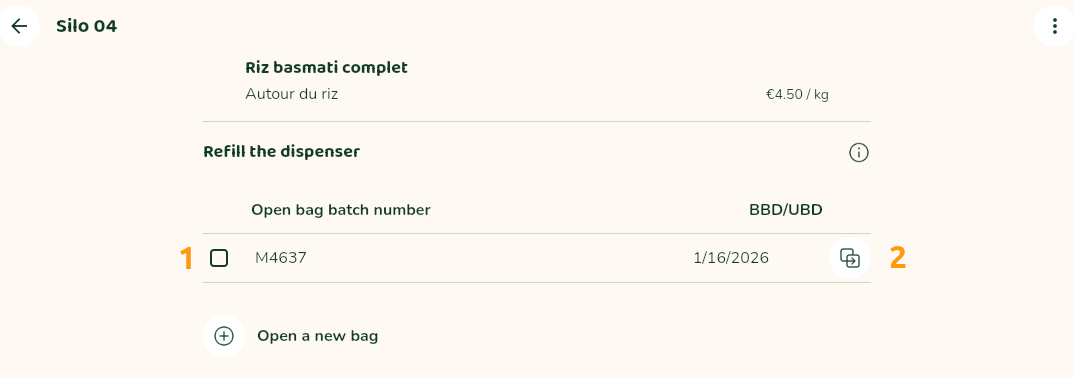
From the list of previous bags, select those still present in the dispenser by ticking the corresponding boxes on the left check_box_outline_blank (1).
Already open bag
If you are refilling with a bag that has already been opened, you can select it from the list by ticking the corresponding box on the left check_box_outline_blank (1).
New bag
Existing batch
When you open a new bag, even if it has the same batch number as a previous bag, you mustn’t select the previous bag from the list of open bags batch numbers.
This is because some products have a secondary shelf life, and this shelf life runs from the date the bag is opened.
Instead, you must click on the right copy button (2) : previously entered traceability information (batch number, BBD/UBD and photo) will be automatically copied for improved efficiency.
New batch
In all cases, you can also register a new bag, different from those already in the dispenser: click on the add_circle icon (Open a new bag) and complete the batch information (see “Recording traceability”).
You can enter up to a maximum of 5 bags for the same product.
The BBD (or best before date) displayed to the consumer will be the shortest.