Recording traceability
Recording traceability
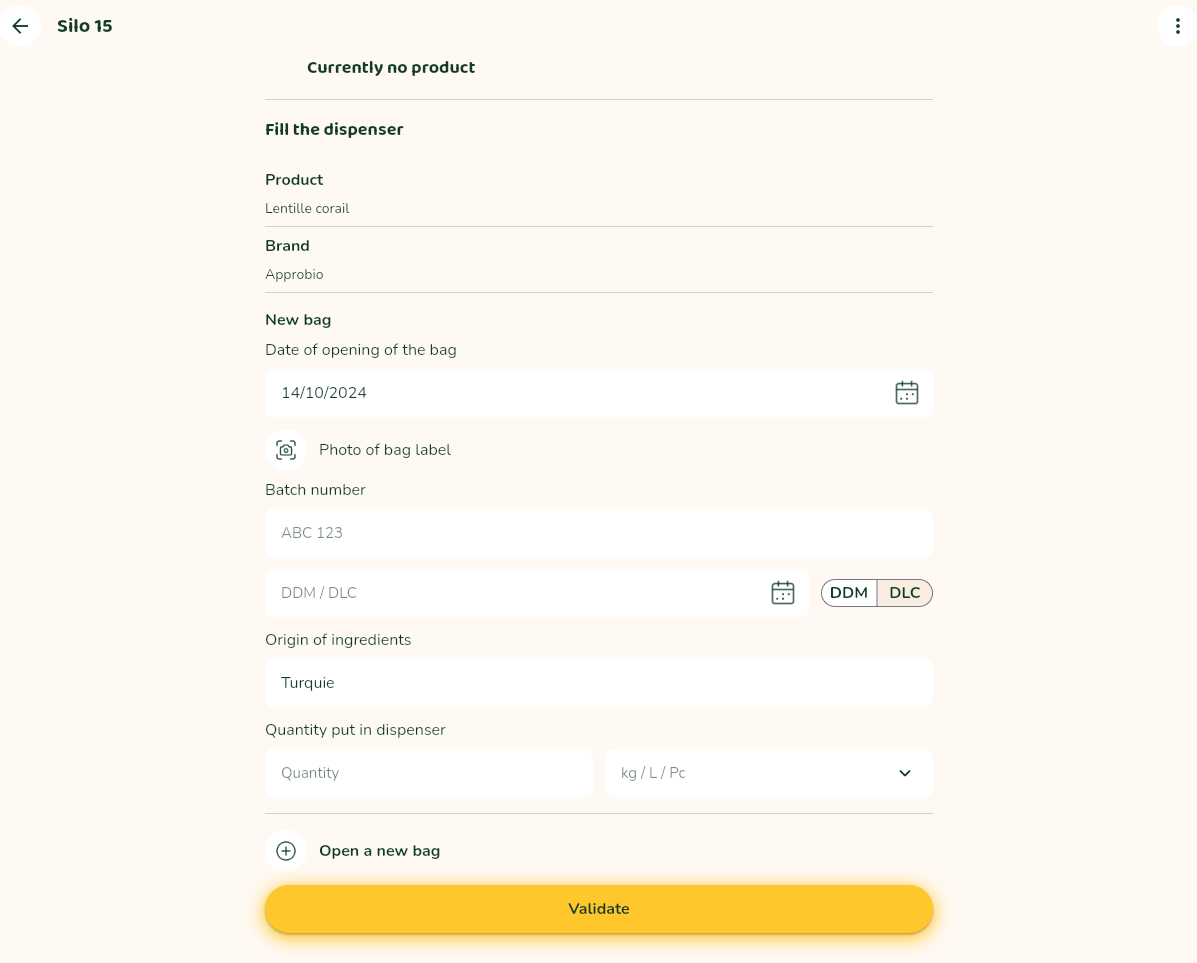
→ 1. Check the batch opening date:
By default, it shows the current date.
If this is correct, you don’t need to do anything.
Otherwise, you can save an earlier date, but not a future one, by clicking on the calendar icon.
→ 2. Record photo of supplier label, batch number, BBD/UBD:
Click on the camera icon to open your camera. Take a clear photo of the complete, uncut supplier label and confirm.
To scan the qr code on the label, you need to authorise Packtic to access your phone’s camera.
Make sure that no other application is using the camera.
You can save up to 2 photos.
A window will open with the automatically recognised batch number.
Check and confirm.
You can change the batch number if necessary by clicking on No.
Another window opens with the automatically recognised BBD/UBD.
Check and confirm.
You can change the date if necessary by clicking on No.
Some product categories are exempt from BBD/UBD (alcohol, vinegar, salt, sugar).
Photos and mobile app
In the case of the mobile app, the mechanism for recognising the batch number and the best-before date/use-by date is different.
When adding a new bag, it is recommended that you take two photos of the label:
-
a first photo focused on the batch number and the best-before date/use-by date
- a first window then allows you to choose the batch number from the detected texts
- a second window suggests the best before date/use by date
-
a second photo of the entire label to ensure complete traceability
→ 3. Check the origin of the product if it is on the label.
By default, this is the one indicated by the supplier.
If you notice a change, you can change the origin manually.
NOTE: remember to note this change on your shelf display.
→ 4. (optional) Enter the quantity of product added to the dispenser.
You can optionally declare the quantity of product put into the dispenser with a unit (Kg / L / Piece).
The quantity of product may be pre-filled:
-
with the value you have declared in a previous filling
-
where applicable, with the quantity of the product in the package as specified by the supplier
If the quantity is declared, you will find it in the traceability book.
→ Confirm. Traceability is recorded and the photo saved!
If you are using several bags to fill the dispenser, you can click on Open a new bag to record the traceability information for the other bags.
You can enter up to a maximum of 5 bags for the same product.