Recording the sales price
You can record the actual sales price of a product present in your store.
To do this, access the dispenser in which the product is currently present, open the menu, click on Enter the actual sales price.
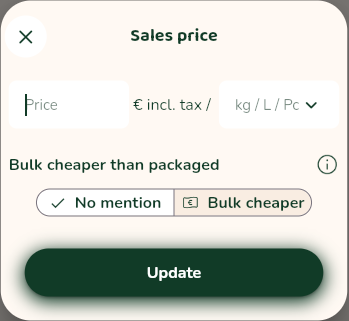
Then, in the sales price entry window:
- enter the sales price
- choose the sales unit (Kg, L or Pc)
- click on
Update
The price entered will then be displayed on the page of the dispenser(s) containing this product, as well as on the printed labels.
Bulk cheaper than packaged statement
In the sales price entry window, you can also claim that the product is sold cheaper in bulk than packaged.
In this case, a statement will appear on the consumer product sheet and on the printed labels.
Promotions
You can declare a special offer on a product.
Do do this, in the sales price entry window:
- select
With promotionfrom the drop-down menu - enter the new price
- option: specify an end date for the promotion
- click on
Update
In case of a promotion, printed labels will be modified as follows:
Promotionbanner (showing the promotion’s end date, if applicable)- the old price struck through
- promotional price of the product
If you have also ticked the option Bulk is cheaper than packaged, this text will not appear in the banner on the printed label in the event of a promotion.
To end a promotion:
- access the dispenser
- open the menu
- click on
Enter the actual sales price - click straight away on
Update(optionWithout promotionselected).
The original price (before the promotion) will once again be shown on the printed label, as before.